
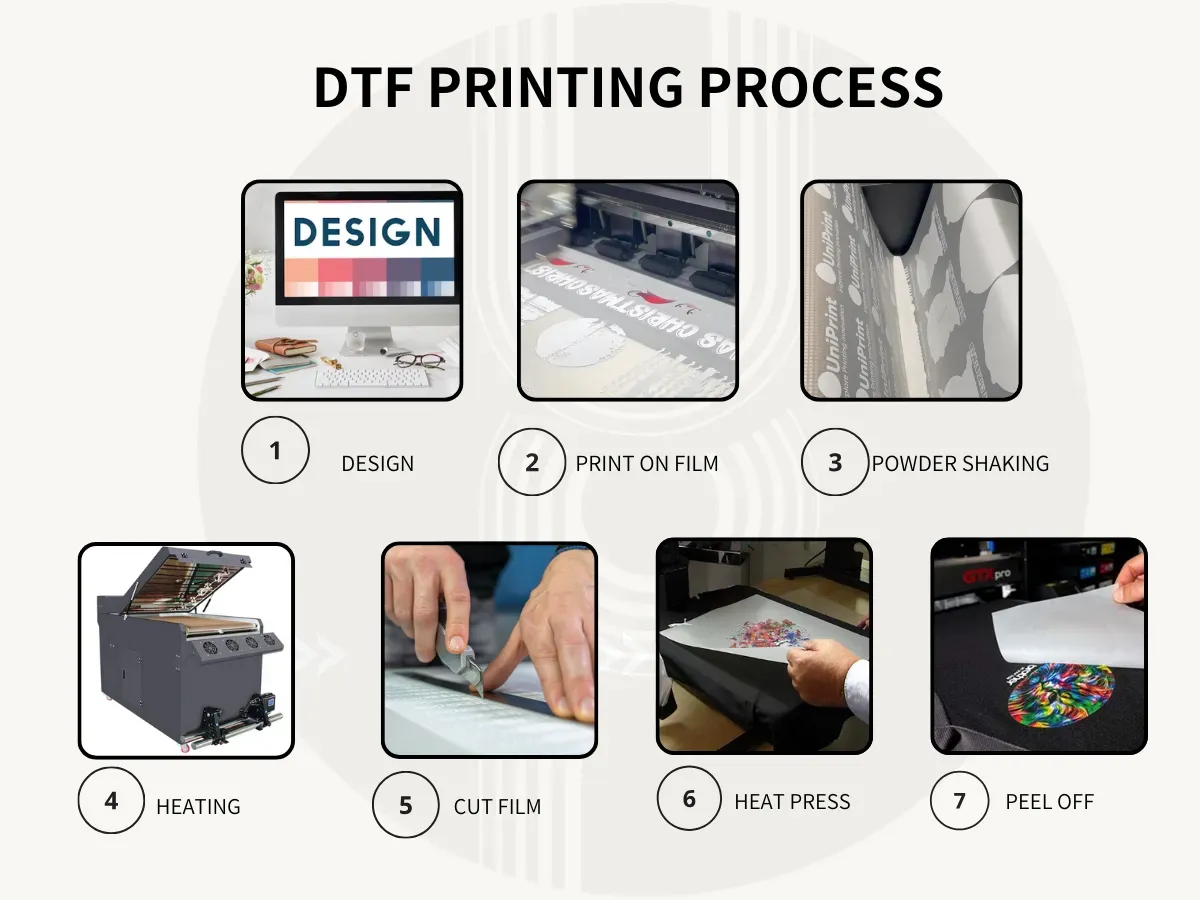
DTF printing quality sits at the heart of successful garment decoration, influencing color vibrancy, edge sharpness, and overall durability. If you want to maximize DTF prints, start with high-resolution artwork, DTF color management, and a workflow that keeps files organized from artboard to transfer. This guide highlights practical steps to safeguard final results, from artwork preparation and substrate choices to consistent color targets. By aligning these elements, you’ll reduce variability and deliver consistent, professional results even on busy production days. A clear workflow and careful documentation help teams reproduce success and scale operations confidently.
Viewed through the lens of film-to-fabric transfers, Direct-to-Film processes reveal how faithfully artwork moves from film to garment affects the final look. This framing emphasizes image fidelity, edge definition, and ink adhesion as core factors in durable, premium outcomes. By focusing on substrate preparation, heat settings, and consistent pre-press routines, studios can achieve reliable output across batches. The goal remains aligned with best-practice approaches: repeatable quality, controlled color, and a comfortable hand feel on every piece. With a robust workflow and rigorous quality checks, teams optimize the transfer process and maintain customer confidence across orders.
Mastering Artwork Prep to Maximize DTF Prints
Begin with a rock-solid foundation: use high-resolution artwork at the final print size and target a minimum of 300 dpi. Whenever logos, icons, or text are involved, prefer vector sources so edges stay sharp when scaled, and convert text to outlines to avoid font substitution during production. Keep files organized by layer so color separations stay predictable at print time and adjustments can be made quickly without compromising DTF printing quality.
This approach aligns with core DTF design tips and directly supports maximizing DTF prints. By preflight-ing assets and maintaining clean, layered files, you reduce surprises on the press and set up you and your team for consistent results across runs.
DTF Color Management: Aligning Screen Proofs with Fabric Reality
Color accuracy hinges on a managed workflow that respects your printer, substrate, and lighting conditions. Work in a color-managed process, choose a stable color mode (often sRGB or a manufacturer-recommended profile), and soft-proof on screen to anticipate how designs will transfer. Regularly calibrate monitors and rely on reliable ICC profiles for media and printers to minimize color shifts that degrade the final result.
When converting to print-ready CMYK or translating RGB with care, you can preserve fidelity from screen to garment. Document color targets, compare test prints, and refine your color management to achieve repeatable, high-quality results. This is at the heart of DTF color management and directly supports consistent output across batches.
Asset Preparation for Crisp Edges: Clean Edges, Alpha, and Safe Margins
Clean edges and well-defined transparency act as the backbone of sharp, printer-friendly designs. Use transparent PNGs for irregular shapes, maintain clean alpha channels, and define bleeds and safe margins so edge-to-edge prints don’t reveal misalignment after trimming. Check for stray pixels or semi-transparent fringes that can print as halos, ensuring raster edges stay crisp and predictable.
Meticulous asset preparation embodies good DTF design tips and ultimately strengthens the reliability of each print. By carefully managing edges, transparency, and margins, you reduce the likelihood of post-production adjustments and improve overall visual integrity on fabric.
Design for Clarity: Avoid Ultra-Thin Strokes and Tiny Details
Thin lines and minuscule text can vanish or blur during transfer, especially on textured fabrics. Design with consistent stroke widths and avoid lines thinner than 0.5 pt whenever possible. If delicate details are necessary, test print at actual size on a similar garment to verify legibility, and consider slightly thickening strokes or using bold outlines to preserve clarity.
These adjustments are part of robust DTF design tips that protect print quality and reduce reprints. Clear, legible details ensure your designs maintain impact across different fabrics and production days, contributing to higher perceived value and reliability.
Gradients and Halftones: Smooth Transitions for DTF Print Quality
Gradients can suffer from banding if color depth isn’t managed properly. Limit palettes to a practical number of colors and avoid abrupt color jumps unless validated on your specific media. When gradients are necessary, use higher color depth and design smooth ramps that your printer can reproduce faithfully.
Halftone textures can add depth without sacrificing clarity if handled correctly. Convert textures to print-friendly halftones and be mindful of screen frequency, as higher frequencies may not translate well on fabric with busy backgrounds. This approach enhances DTF printing quality while aligning with Direct-to-Film printing best practices.
Substrates, Pre-Press, and QC for Reliable DTF Prints
Substrate preparation matters as much as the artwork. Pre-treat fabrics as needed to improve ink adhesion and color fidelity, especially on cotton blends or darker garments. Run a test print on a sample swatch to gauge ink interaction and verify transfer crispness and durability, then pre-press to remove moisture and wrinkles to stabilize the substrate.
Document substrate types and pre-press conditions so teammates can reproduce successful results across runs. Following Direct-to-Film printing best practices helps achieve uniform outcomes, reduced waste, and steady DTF print quality across orders. A disciplined substrate and pre-press routine sets the stage for dependable production and satisfied clients.
Frequently Asked Questions
How can you maximize DTF prints while preserving DTF printing quality?
To maximize DTF prints without sacrificing quality: start with high-resolution artwork (300 dpi at final size) and use vector sources for logos; avoid upscaling rasters. Maintain a color-managed workflow with regular monitor calibration and ICC profiles, and soft-proof to anticipate results. Prepare assets with clean edges and safe margins, and test prints on similar fabrics to confirm durability. Document printing settings to ensure repeatable, high-quality outcomes.
What DTF design tips contribute most to reliable DTF printing quality?
Prioritize high-resolution artwork and crisp edges, with safe margins and clean alpha channels. Convert text to outlines and avoid ultra-thin strokes to preserve legibility and edge clarity. Use print-friendly textures and controlled halftones, then test at actual size on similar garments to validate detail and overall DTF print quality.
How does DTF color management affect DTF printing quality and color fidelity?
A color-managed workflow is essential. Work in a consistent color mode (e.g., sRGB or a manufacturer profile) and soft-proof to preview results. Calibrate monitors, use reliable ICC profiles for media and printer, and translate RGB to CMYK carefully to minimize color shifts. Document targets and compare test prints to refine DTF color management for repeatable quality.
What are Direct-to-Film printing best practices to optimize DTF print quality?
Follow Direct-to-Film printing best practices: ensure artwork is print-ready with calibrated color management, prepare substrates properly, and run test prints before large batches. Use the highest practical resolution and suitable print mode for the substrate, and verify raster-to-vector separations so color channels align with intent. Fine-tune ink density and pass count to achieve crisper lines and richer color.
How do substrate prep, pre-press, and curing steps impact DTF print quality?
Substrate preparation is critical for ink adhesion and color fidelity. Pre-treat fabrics as needed and perform a test swatch to gauge interactions. Pre-press to remove moisture and wrinkles to stabilize the substrate, then cure at recommended times and temperatures to preserve image integrity. Document substrate types and pre-press conditions to reproduce results consistently.
What QA and proofing steps sustain DTF printing quality across production runs?
Implement a rigorous proofing process with color checks, edge integrity, and adhesion tests on representative fabrics. Maintain logs of approved artwork, substrate, and operator notes to ensure repeatability, and involve color-critical stakeholders in reviews. Regularly calibrate equipment and re-validate color targets to reduce waste and keep quality consistent.
| Tip | Focus Area | Key Points |
|---|---|---|
| Tip 1: Start with high-resolution artwork | Artwork & Resolution | 300 dpi at final size; prefer vector sources; convert text to outlines; avoid upscaling raster; organize files by layer; expect clean edges and predictable color separations. |
| Tip 2: Nail color management and color modes | Color Management | Use a color-managed workflow; start with a consistent profile (e.g., sRGB); soft-proof; calibrate monitors; use reliable ICC profiles; translate to CMYK carefully to minimize shifts. |
| Tip 3: Prepare assets with clean edges, proper transparency, and safe margins | Asset Preparation | Use transparent PNGs for irregular shapes; maintain clean alpha channels; define bleeds and safe margins; check for stray pixels; ensure crisp raster edges. |
| Tip 4: Avoid ultra-thin strokes and tiny details | Stroke & Detail | Avoid lines thinner than 0.5 pt; test print at actual size; slightly thicken delicate details or use bold outlines to preserve clarity. |
| Tip 5: Optimize color palettes and manage gradients | Color & Gradients | Limit palettes; avoid extreme color jumps; use higher color depth for gradients; generate smooth ramping that your printer can reproduce. |
| Tip 6: Use print-friendly textures and realistic halftones for depth | Textures & Halftones | Convert textures to halftones; mind screen frequency; ensure photographic images are sharpened and color-corrected before printing; avoid moiré. |
| Tip 7: Prepare substrates and pre-press processes | Substrates & Pre-Press | Pre-treat fabrics as needed; run a test print on a swatch; pre-press to remove moisture/wrinkles; document substrate types for repeatability. |
| Tip 8: Fine-tune print settings and output files | Print Settings | Use the highest practical resolution; select best print mode for the substrate; print calibration swatches; ensure correct raster-to-vector separations; adjust density, ink limits, and pass count. |
| Tip 9: Follow curing and finishing steps | Curing & Finishing | Follow recommended times/temperatures/pressure; avoid under- or over-curing; allow cooling; perform post-press inspection to catch issues early. |
| Tip 10: Implement rigorous proofing and QA process | Proofing & QA | Create a standard proofing process; log artwork and substrate details; involve color-critical stakeholders; regularly calibrate equipment and re-validate color targets to sustain quality. |
Summary
Conclusion: Putting it all together for lasting DTF printing quality. Maximizing DTF printing quality is not about a single adjustment; it’s a cohesive design and production strategy. Start with high-resolution artwork and smart color management, prepare assets meticulously, and consider print and substrate specifics to protect edge clarity and color fidelity. By applying the 10 design tips outlined here, you’ll improve not only the initial appearance of your prints but also their durability and consistency across runs. Remember to document your workflow, run test prints, and iterate. With a careful approach to design, you can achieve reliable, repeatable outcomes that elevate your DTF printing quality and help you stand out in a competitive market.